Password Resets using Entra ID
There are two ways you can reset your password. Either via Entra ID My Account page, or using the Forgot Password method.
My Account Page Method
- Navigate to your My Account Page here https://myaccount.microsoft.com
-
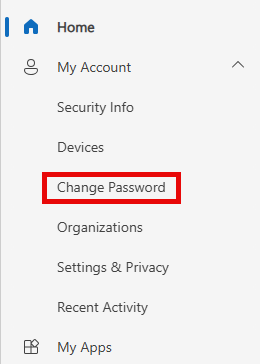
Click on "Change Password".
-
Respond to any MFA challenges, enter your new password twice, click "Submit".
Forgot Password Method
Note
To use this method, you must have two different authentication factors registered to authenticate your account - e.g. Microsoft Authenticator, Google Authenticator, YubiKey, Security Question and Answers.
- Navigate to the Forgot Password link here https://aka.ms/sspr
- Your identity is verified using two of your enrolled MFA Factors.
- After your identity is verified you will be able to set your password.